What’s the Best SIM Card for CCTV Cameras? Data Use, Monthly Cost and Fixed-IP Access Explained
The short answer
The cheapest data SIM is the wrong SIM for CCTV, because the whole point is removing attack vectors. Commodity SIMs (from ~£9 for 100 GB) give cameras open access to the public internet — and their vendor cloud services make them reachable from it; a managed-core SIM takes them off it entirely — three endpoints or three hundred, with zero public exposure, locked to your recorder, reached over an encrypted tunnel. Buy security, not gigabytes.
Connected cameras are one of the most attacked device classes on the internet — hijacked into botnets, browsed through exposed ports, and used as the way into the rest of the network. So the SIM decision for CCTV is not really a data-pricing decision; it is a security decision. This guide covers the data maths, the connectivity options and the honest costs — and why what your cameras are connected through matters more than the price per gigabyte.
Why the SIM matters more than the camera
Cameras get positioned for the best view, not the best signal — up a pole, on a gable end, in the far corner of a compound. That means the SIM often runs at the ragged edge of coverage, and a SIM locked to a single operator has no fallback when that operator’s nearest mast is congested, down for maintenance, or simply weak at your exact spot. The classic failure mode is a camera that worked fine on the installer’s phone test (on their network) and then drops offline weekly on yours.
The second trap is data behaviour. A CCTV camera is not a phone: it may push footage continuously, in motion-triggered bursts, or only when you open the app to view. Which of those your system does determines whether you need 1 GB a month or 500 GB, and picking the wrong plan either wastes money every month or gets the camera cut off mid-incident — usually the exact moment you needed it. So the buying decision comes down to two questions: how much data will this camera genuinely move across the SIM, and will the SIM hold a connection where the camera is mounted? The data and multi-network sections below answer both.
The £9 SIM: why cheap data is the expensive mistake for CCTV
Let us be straight about the market: simple bulk-data SIMs are cheap — around £9 for 100 GB from the commodity providers. If all you need is raw internet data for a dashcam or a hobby project, buy one; we will not pretend otherwise. That is not what we sell, and for CCTV it is not what you need.
“But surely NAT protects them?” Only by accident — and the real attack paths go around it. Cameras are compromised through the connections they make outbound: the vendor peer-to-peer and cloud viewing services most cameras ship with exist precisely to punch through NAT, so anyone with the right credentials — default, stolen or brute-forced — or an exploit in those services reaches the camera through its own outbound channel. Firmware and update fetches are another route in. A commodity SIM sits in a shared carrier address pool alongside millions of strangers — whether those devices can reach each other varies by network and APN, and it is carrier configuration you can neither see nor control. And once any device is infected it happily calls out to its controller — no inbound connection required. Hijacked cameras remain a staple of botnets for exactly these reasons. On a site security system, the connectivity is part of the attack surface.
What a managed core actually gives your cameras
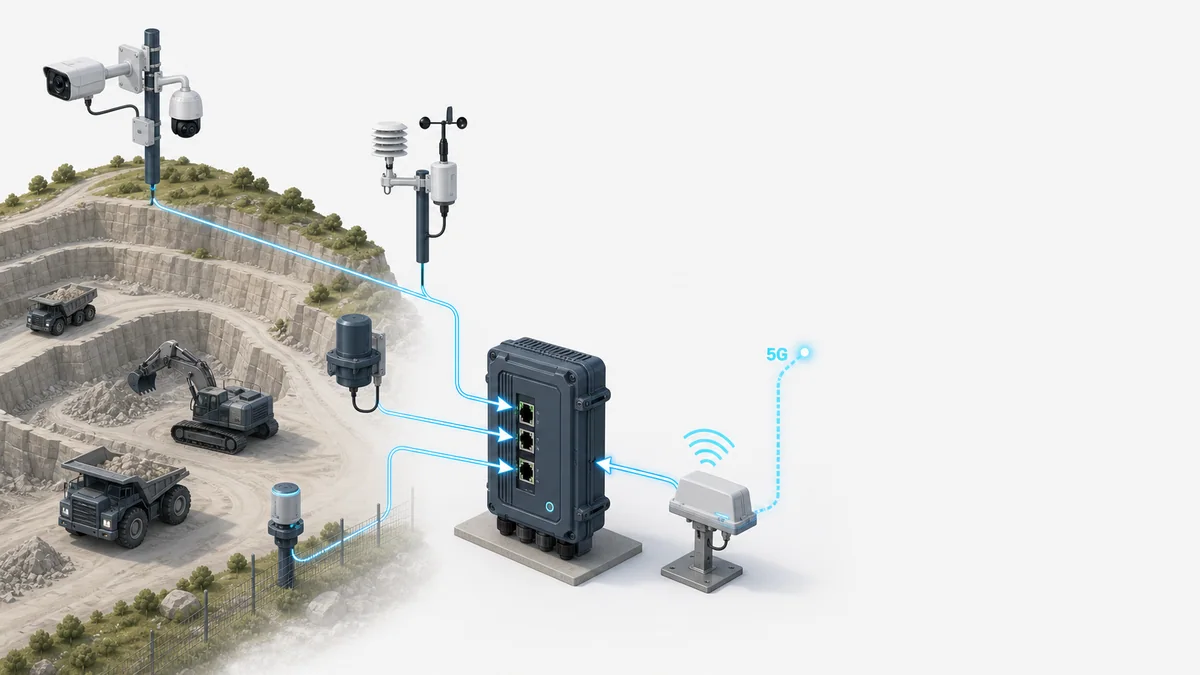
The whole point is removing attack vectors. An endpoint that is not on the internet cannot be scanned, found or hijacked from it — and with a managed core, your entire camera estate, whether that is three endpoints or three hundred, simply is not on the internet. Seneca’s Ultra Secure IoT SIMs run on a programmable managed mobile core, which is what makes that possible:
- Private networking — your cameras live on their own private network slice, not the public internet; nothing can reach them from outside
- Traffic policy — routing rules lock each SIM down so a camera can talk to your NVR or video platform and nothing else. That closes the outbound routes attacks actually use: no vendor P2P rendezvous, no unknown update servers, no path to a botnet controller
- Fixed private IP addressing — every camera at a stable, private address for clean integration with your recorder or VMS
- Core-routed VPN — camera traffic is delivered from the mobile core straight into your office, server or cloud network over an encrypted tunnel; no special routers and no per-site VPN configuration
- Multi-network access — the SIM can use any available UK network at the camera’s location and move between networks
- Visibility and control — see every connection, cap or suspend a SIM instantly, and trigger alerts when a camera goes offline
How much data does a CCTV camera use per month?
Data use is just bitrate multiplied by time, so it can be calculated honestly rather than guessed. The key distinction: data crosses the SIM only when footage leaves the camera. A camera recording to a local SD card or NVR uses almost nothing until you view remotely or it uploads a motion clip. A camera streaming continuously to the cloud moves everything, all the time.
The table below uses a typical 1080p camera with H.265 compression at 2 Mbps on the main stream (2 Mbps ≈ 0.9 GB per hour of video transferred), 20-second motion clips, and roughly 500 KB per snapshot. H.264 cameras use nearly double these figures; 4K roughly quadruples them. All figures are per camera.
| Usage pattern | Assumptions | Data per day | Data per month |
|---|---|---|---|
| Snapshots / stills only | 1 image per hour + alert stills, ~500 KB each | ~15–30 MB | 0.5–1 GB |
| Motion clips, quiet site | 10 events/day × 20-second clips (~5 MB each) | ~50 MB | 1.5–2 GB |
| Motion clips, busy site | 50 events/day × 20-second clips | ~250 MB | 7–8 GB |
| Motion clips + daily live viewing | Busy site plus 30 min/day remote viewing at 2 Mbps | ~700 MB | 20–22 GB |
| Continuous cloud recording | 24/7 upload at 2 Mbps | ~21.6 GB | ~650 GB |
Two footnotes to the table: firmware updates, heartbeats and app keep-alives add a small overhead, so budget an extra 100–300 MB per month; and continuous cloud recording over 4G is rarely sensible — record locally to SD or NVR and pull footage on demand instead.
Multi-network vs single-network SIMs: which is better for CCTV?
A single-network SIM (an EE, O2, Vodafone or Three SIM) connects only to its own operator’s masts — and note Vodafone and Three merged in 2025, with their networks being combined. If that operator is strong at your site, it works — until the day it doesn’t. Mast maintenance, congestion and cell reconfiguration all happen without notice, and an unattended camera has no one on site to notice it has dropped, reboot it, or swap the SIM. For a rural compound, farm or construction site, you are betting the whole system on one operator’s coverage at one fixed point.
A multi-network (roaming) SIM can attach to any UK network with usable coverage at the camera’s location and re-attach to another if its network fails — one SIM, every UK network’s masts, instead of a single point of failure. For unattended CCTV in anything less than perfect signal, that redundancy is worth more than any other feature on the spec sheet — it converts “camera offline, send someone to site” into an event the SIM rides out on its own. Coverage checkers also mislead here: they model outdoor signal at head height, not inside a steel camera housing at six metres. The honest comparison is straightforward: a single-network SIM can be slightly cheaper and occasionally holds a stronger connection on that one network’s best sites, but a multi-network SIM is the right default for CCTV because the failure it protects against — silent offline cameras at unmanned locations — is precisely the failure CCTV exists to avoid. This is why our Ultra Secure IoT SIMs at https://shop.senecaenterprise.com are multi-network as standard.
Remote access to your NVR: CGNAT, fixed-IP SIMs and VPNs explained
Here is the part that catches most people out. A standard mobile SIM sits behind carrier-grade NAT (CGNAT): the operator gives your router a shared, private IPv4 address, which means nothing on the internet can open a connection inbound to it. Port forwarding — the traditional way to reach an NVR remotely — simply does not work over a normal 4G SIM. Your router can call out; nobody can call in. One important caveat before you rely on that: CGNAT is an address-sharing workaround, not a firewall — the protection it gives is incidental, and as covered above, the ways cameras actually get compromised mostly travel outbound, straight through it.
There are three ways round it. First, manufacturer cloud services (Hik-Connect, Reolink Cloud, Uniview EZCloud and similar): the camera maintains an outbound connection to the vendor’s servers and your phone app meets it there. This works through CGNAT with zero configuration and is fine for most small installs, though you are trusting the vendor’s cloud with your footage path. Second, a fixed-IP (static IP) SIM: the SIM is issued an IP address that is directly reachable, so your NVR behaves as it would on a fixed line — direct RTSP streams, third-party VMS platforms, professional monitoring stations. It has its place, but a directly reachable NVR must be firewalled properly — internet-exposed NVRs are a favourite target for botnets.
Third, and how we do it: the VPN is built from the network, not the camera. With our managed-core SIMs, traffic from every camera SIM is routed from the mobile core’s gateway over an encrypted tunnel (WireGuard or IPsec) straight into your office, server or cloud network — so the NVR and cameras behave as if they were on your LAN. It works through CGNAT, exposes nothing to the public internet, and because the routing lives in the core rather than in each router, it needs no special camera-side hardware, no per-site VPN configuration, and it scales cleanly to many sites — this is how we run our own multi-site systems.
What a 4G CCTV connection costs per month in the UK
Now the prices make sense in context: you are buying managed, secured connectivity, not bulk data. Our Ultra Secure IoT SIM plans start at £6.95 a month, multi-camera sites suit pooled data, and the table below sets out every tier. A four-camera compound on a 25 GB pool comes to £56.95 a month all-in — private networking, traffic policy and fixed private addressing included. If a £9 bulk-data SIM is genuinely the right answer for your use, we will say so; for site security, it rarely is.
| Plan | Monthly | Annual option | Suits |
|---|---|---|---|
| Ultra Secure IoT SIM — 1 GB | £6.95/mo | £69/yr | Snapshot-only single camera |
| Ultra Secure IoT SIM — 5 GB | £17.95/mo | £179/yr | Motion-triggered camera, typical site |
| Ultra Secure IoT SIM — 10 GB | £29.95/mo | £299/yr | Busy site or occasional live viewing |
| Managed SIMs + 10 GB pooled data | £3.00/SIM + £20.95 | — | 2–3 camera site, motion recording |
| Managed SIMs + 25 GB pooled data | £3.00/SIM + £44.95 | — | 4–6 camera site, motion recording |
| Managed SIMs + 50 GB pooled data | £3.00/SIM + £76.95 | — | Larger sites or regular live viewing |
Weak signal at the camera? Fix the signal, not just the SIM
A multi-network SIM picks the best available network, but if every network is weak at the camera position, the fix is engineering rather than SIM choice. In rough order of cost: an external high-gain antenna on the 4G router (often the whole fix for a metal cabinet or plant room), repositioning the router away from the camera so each sits where it works best, or an Ofcom-compliant licence-exempt smart booster where a building blocks signal — we stock Ofcom-compliant Nextivity units at the shop — the CONNECT C41 at £794.40 and GO G41 at £1,123.20 inc VAT for buildings, plus the ROAM R41 (£639.60) for vehicles and vessels. One legal note worth knowing: mobile repeaters are only legal to self-install in the UK when they are compliant smart models meeting Ofcom’s licence-exemption requirements — single-operator and multi-operator versions, 4G and 5G, for static indoor use (higher-power systems are deployed under an operator’s licence as part of an engineered project). The cheap wideband boosters sold on marketplace sites are illegal to operate and cause interference the operators do trace. For larger buildings where boosting one operator isn’t enough, in-building coverage systems are their own discipline — that’s core Seneca work, and a different page.
And there is a top rung on this ladder: stop depending on public coverage at all. Where the site itself is the problem — a farm, a large compound, a remote yard where every public network is thin — a private 5G network puts your own radio on a mast and your own SIMs in the camera routers, with coverage exactly where you point it and none of it shared with the public. The security model is the same story as this page taken to its conclusion: your cameras on your network, end to end. Entry bundles start at £9,562 inc VAT — see our private 5G cost guide at https://senecaenterprise.com/private-5g-network-cost-uk/ for real numbers.
How Seneca helps, and what to do next
We’re connectivity engineers, not a SIM reseller with a webshop bolted on. For a single camera, order an Ultra Secure IoT SIM from https://shop.senecaenterprise.com, size it from the data table above, and it will arrive ready to work in any unlocked camera or router. For multi-camera sites, compounds and estates we design the whole connection: pooled SIM estates, VPN access to NVRs, external antennas, and signal surveys where coverage is marginal — see our smart surveillance work at https://senecaenterprise.com/verticals/smart-surveillance-systems.
If you’re not sure which pattern your system fits — or you’ve got a camera that keeps dropping offline and want it diagnosed properly — tell us the site postcode, camera count and recording setup at https://senecaenterprise.com/get-a-quote/ and we’ll come back with a sized, priced recommendation rather than a brochure.
Frequently asked questions
How much data does a CCTV camera use per month?
It depends entirely on what crosses the SIM, not what the camera records. A 1080p H.265 camera recording locally and uploading motion clips typically uses 1.5–8 GB per month depending on how busy the site is. Add roughly 0.9 GB per hour of remote live viewing — about 7 GB a month for 15 minutes a day. Continuous 24/7 cloud upload at 2 Mbps is around 650 GB per month — record locally instead and pull footage on demand.
If CGNAT blocks inbound connections, how do 4G cameras get hacked?
Because the attacks travel outbound. Cameras constantly call out — to vendor P2P and cloud viewing services (which are designed to punch through NAT), to update and firmware servers, to DNS. Attackers come in through those channels: default or stolen credentials on the viewing service, vulnerabilities in the P2P scheme or vendor cloud, and poisoned update paths. A commodity SIM also shares carrier address space with millions of other devices — whether they can reach each other depends on carrier configuration you cannot see or verify — and an infected camera needs no inbound access at all — it calls its controller itself. CGNAT is address-sharing, not a firewall. A managed core closes these routes by policy: the camera can reach your recorder and nothing else, in either direction.
What is the best SIM for a CCTV camera in a poor signal area?
A multi-network SIM, paired with an external antenna on the router if the signal is genuinely marginal. A multi-network SIM connects to the strongest of the UK networks at that exact spot and can re-attach to another network if its current one degrades — which matters because nobody is standing next to an unattended camera to notice it has dropped. If all networks are weak, the fix is antenna gain or an Ofcom-compliant booster, not a different SIM.
Is a multi-network SIM better than an EE SIM for CCTV?
Two separate wins. Coverage: a multi-network SIM uses the strongest available network at the camera rather than whatever one operator provides there. Security: Seneca’s SIMs run on a managed core, so cameras sit on a private network with traffic locked to your recorder — which no ordinary single-network data SIM, EE or otherwise, gives you.
Do I need a fixed-IP SIM for remote access to my NVR?
Usually not. With our managed-core SIMs the encrypted tunnel is built from the mobile core’s gateway straight into your office, server or cloud network, so you reach the NVR as if it were on your LAN — through CGNAT, with nothing exposed to the public internet, no special camera-side router and no per-site VPN configuration. Fixed-IP SIMs suit direct-reach cases like VMS platforms and monitoring stations, but a directly reachable NVR must be properly firewalled.
What does a 4G connection for CCTV cost per month in the UK?
Commodity bulk-data SIMs cost as little as £9 for 100 GB — but they connect cameras to the public internet. Managed, secured connectivity from Seneca runs £6.95–£29.95 a month per SIM by data plan, or £3.00 per SIM plus a shared pool (10–50 GB, £20.95–£76.95) for multi-camera sites — a four-camera site lands around £56.95 a month with private networking and traffic policy included. You are buying security, not gigabytes.
Can I use one SIM plan for cameras across multiple sites?
Yes — that’s exactly what pooled data is for. Each camera or router gets a £3.00/month managed SIM and every SIM draws from one shared allowance (10 GB £20.95, 25 GB £44.95, 50 GB £76.95 per month), so a quiet site subsidises a busy one and no individual camera hits a hard cap. And because traffic from every SIM is delivered from the mobile core into your network over one encrypted tunnel, you can bring every NVR onto one network and view all sites from one place — with no per-site VPN configuration.
Order multi-network CCTV SIMs today at shop.senecaenterprise.com — or send us your site details for a sized, priced recommendation.
Ready when you are