Seneca Enterprise

Home / Mobile coverage / Vehicles & proof of delivery

DAS & cellular repeating / Vehicles & proof of delivery

Mobile coverage for vehicles & proof of delivery.
Close the delivery while the details are fresh.

Get the signature, photograph and delivery status into the system. Connect the cab, depot and handover workflow so teams spend less time chasing yesterday’s delivery.

Seneca designs cellular coverage around your people, premises and working devices, from suitable repeaters to distributed antenna systems (DAS).

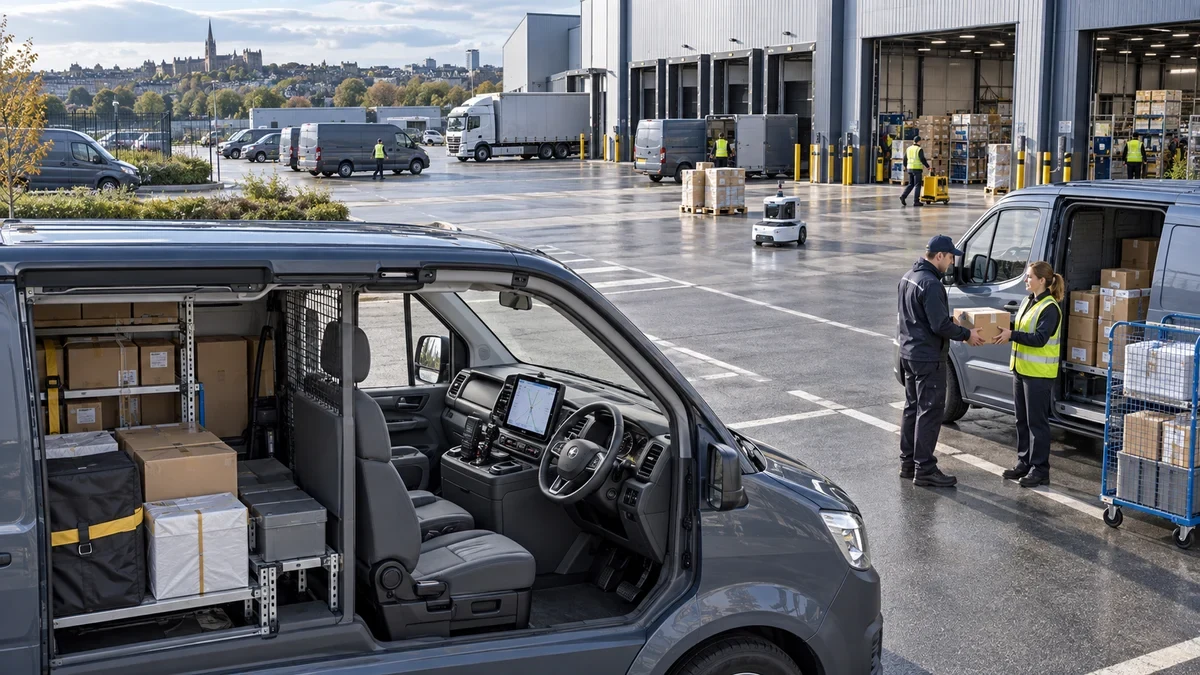
Illustrative delivery depot with parked vans, a driver handover and warehouse loading bays.

Why better coverage matters

Make the connection count.

Existing devices

Support the fleet’s working tools

A suitable vehicle repeater brings available outside mobile service to compatible handsets and working devices inside the vehicle. We match the system to the operator and installation.

Less waiting

Bring data into the vehicle bay

Depot mobile coverage connects compatible vehicle computers inside the building, helping teams exchange job information before departure.

Complete records

Keep the handover connected

Mobile coverage at receiving bays lets drivers upload delivery records and share exceptions at the handover, reducing missing updates for the office to chase.

Around your operation

Close the delivery while the details are fresh.

Delivery work crosses several coverage environments: the depot, the vehicle cab, the roadside and the customer’s building. A connected cab helps the driver synchronise work, while coverage at the receiving point helps complete the record where the goods change hands.

Design for the places that matter

Select around the actual device and application. A compliant in-vehicle repeater can support suitable cellular devices in its designed area; a cellular router provides a separate data connection to connected equipment. Depot and customer-premises coverage need their own assessment.

The proposal identifies the networks, services and areas included, with a practical acceptance check built around the devices your people actually use.

In everyday use

Put the connection to work.

01

Send the proof of delivery before the next stop

A driver hands over a consignment, scans the items and captures the recipient’s signature and delivery photograph on an approved handheld. Where the receiving location has usable mobile service, the application uploads the record immediately. The customer-services team can see the completed delivery and answer an enquiry using the same information as the driver.

If the application records the handover offline, the driver synchronises it from the parked vehicle once an available connection is established. A suitable cab connection supports that step within its designed coverage area; it does not extend service through every customer building. The workflow keeps the original evidence together and makes exceptions visible before the driver starts the next part of the route.

The opportunity: faster delivery-status updates and fewer calls asking whether the goods arrived.

02

Resolve a delivery exception while the driver is parked

A driver reaches a delivery point and finds that part of the order cannot be accepted. With the vehicle safely parked, they send the reason, photographs and item references to the transport office through the fleet application. The planner checks the order and confirms the next action while the details are still clear.

The application keeps the decision with the consignment, so customer services and the warehouse can see the same record. Vehicle connectivity is selected around the route, supported mobile networks and device setup, with offline handling built into the workflow. The driver has an agreed instruction before moving on, and the office spends less time piecing the exception together from separate messages.

The opportunity: clearer delivery exceptions and less administrative chasing between teams.

03

Leave the depot with the current delivery plan

Before departure, a driver sits in the parked vehicle and opens the delivery application to retrieve the current manifest, customer instructions and collection changes. Coverage in the depot bay lets the device synchronise while the transport team is still nearby. The driver checks an unclear address with the planner and confirms that the route information is available before leaving.

The planner can see that the update has reached the device, rather than waiting for the vehicle to regain a connection farther down the road. Building coverage serves the depot, while any in-vehicle equipment supports its own agreed area and devices. This makes the start-of-shift handover more complete and gives the driver a better basis for handling the day’s deliveries through the application’s normal online and offline workflow.

The opportunity: fewer missed route changes and a cleaner handover from planning to the driver.

The right design for the job

Start with the service you need.

Signal, distribution and demand

A cellular repeater receives an available mobile service and retransmits it into an agreed area. A DAS distributes a suitable cellular source through antennas placed around a larger estate. These approaches can work together; the source and operator arrangements determine the available services and capacity.

Select around the actual device and application. A compliant in-vehicle repeater can support suitable cellular devices in its designed area; a cellular router provides a separate data connection to connected equipment. Depot and customer-premises coverage need their own assessment.

Connect each part of the journey

Only equipment and installations meeting the applicable authorisation conditions should be used. A repeater needs available network service and cannot fill every rural dead zone or cover the inside of a customer’s premises from the cab. Plan offline handling, antennas and any multi-network router alongside the application.

Read the relevant guidance ↗

Planning & costs

We help turn the opportunity into a working solution.

We assess reception, the people using the service and the areas where calls or mobile tasks break down. We recommend the signal source and distribution system and explain the installation and ongoing support costs.

We handle the technical assessment and help connect the investment to useful results. The first conversation starts with what you want to achieve.

One area or the whole estate.

Start with a focused deployment and expand, or move ahead with a full programme. We shape delivery around your priorities and readiness, and coordinate installation with your operation.

Talk to our team

Straight answers

Planning mobile coverage for vehicles & proof of delivery.

Will people keep their existing phones and SIMs?

The aim is to support existing subscriptions and compatible devices on the networks included in the design. We confirm operator support, frequency bands and the actual equipment before choosing the system.

Can you cover more than one mobile network?

Yes, suitable designs support several operators. The signal sources, equipment and authorisation arrangements determine which networks are included. The proposal lists these explicitly.

Does this replace Wi-Fi or a private network?

These services do different jobs. Public mobile coverage connects supported cellular devices to their operators. Wi-Fi and private networks serve their own local devices and applications. The coverage design identifies which connection each service uses.

How do we scope the project?

Start with the delivery application, vehicle type and places where updates queue. Tell us where reception is getting in the way. We assess the estate and help build the business case, then manage the installation and support around your operation.

How is coverage matched to our site?

We match coverage to the building, the mobile operators your people use and the available signal and capacity. Survey percentages describe the problem people experience; they are not installation improvement figures.

Make mobile coverage work for your operation.

Get the signature, photograph and delivery status into the system. Connect the cab, depot and handover workflow so teams spend less time chasing yesterday’s delivery.